
Safety Is A Right Campaign |
Safety Is A Right Campaign |

imabi Travel Guardian: The UK’s Leading Free Personal and Travel Safety App
imabi Travel Guardian is the UK’s leading free travel safety app, combining journey sharing, real-time location alerts and trusted reporting tools to help everyone travel safely and stay connected.
A groundbreaking evolution of the highly successful Railway Guardian app. Designed to enhance public safety for everyone, everywhere, imabi Travel Guardian brings expanded support, content, and services to ensure safe travel across all modes of transportation. It also powers imabi Connect, giving local authorities, councils, businesses, and organisations the ability to share tailored safety updates, campaigns, and resources directly with the public, helping everyone stay safe, connected and informed, everywhere

Expanding Safety Across All Forms of Travel



Download the FREE app:

Safety Is A Right Campaign |
Safety Is A Right Campaign |

Building on Success
Since its launch, the Railway Guardian app has played a pivotal role in improving passenger safety on the rail network, particularly in addressing Violence Against Women and Girls (VAWG). By empowering passengers to report incidents and encouraging bystander intervention, it has contributed to a remarkable 51% increase in incident reporting on the train network over the last two years.
With imabi Travel Guardian, we are extending this success to cover all forms of transport - trains, buses, taxis, trams, ferries, flights, and more - ensuring a safer journey for everyone and everywhere.
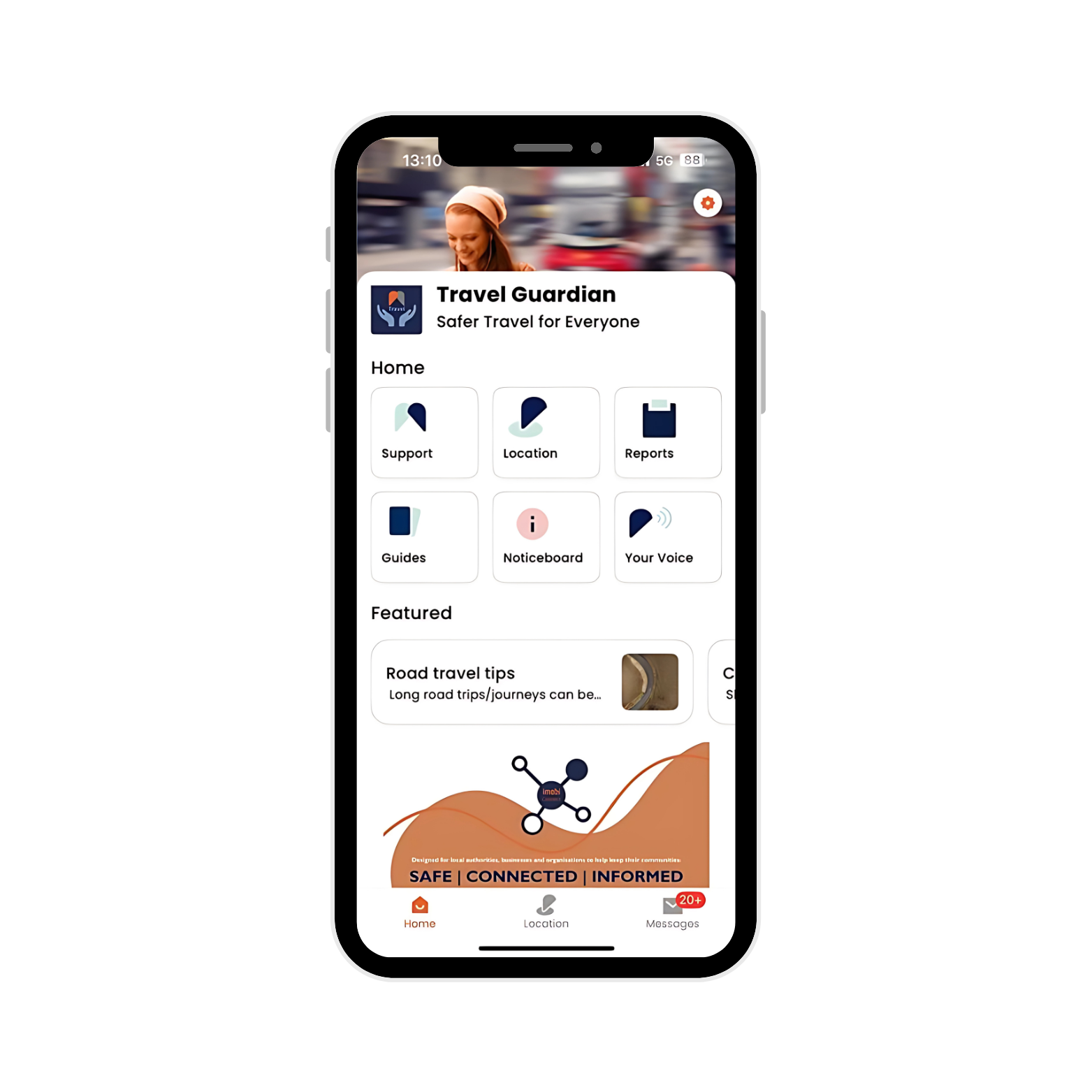

Key features include:
Guides: access to useful information on topics such as personal safety, health, wellbeing, travel and online security
Report: imabi has partnered with CrimeStoppers, allowing you to anonymously report crimes and suspicious or unacceptable behaviour in public places
Support: access to support links of key charities and organisations for guidance and advice, including the ability to directly dial their helplines
Noticeboard: access to essential information, services and features, national and regional campaigns promoted by our partners
Messages: provides real-time national and regional alerts to help keep you safe and well, including live updates on nearby situations with the potential to affect you
Your Voice: ability to share harmful and anti-social behaviours anonymously, share personal experiences, respond to national surveys or answer topical snapshot questions.
Your Voice really can make a difference with creating community improvement programmes.
Key services include:
Geolocation tools help to reassure friends and family you’re safe and well, providing peace of mind in one tap:
Share Journey: let your trusted and selected contacts know you are on the move
Share Arrival: let your trusted and selected contacts know you have arrived at your destination safely
Rescue Me: alert your trusted and selected contacts about what assistance you need
Near Me: select map layers that show and navigate you to various safety and support locations e.g. Safe Spaces, Defibrillators, Public Phones, Bust Stops, Train Stations, etc.
Location Alerts: create a trusted group e.g. family, friends, work colleagues and allow the group to receive alerts when a group member enters or exits predefined locations e.g. Home, School, Work. Each group member can turn their sharing permission on or off at anytime
Sharing Groups: create and manage your own circle of trusted contacts to share your journey or location with
Privacy: you control when, how long and who you share your location with. Meaning no one can know your location without your permission

Watch our Tutorial Videos or read our app user handbooks to find out how each one of the features and services work
In summary, the imabi Travel Guardian app promotes engagement, information sharing, and support within your community, offering a valuable tool that’s aimed at building and enhancing societal cohesion and cooperation.
-
Travel Guardian is free to download from the Apple App Store and Google Play Store.
Search for “imabi Travel Guardian”, then tap Download or Install. -
Yes. Travel Guardian is completely free to download and use. There are no subscription fees or in-app charges.
-
You can explore Travel Guardian without creating an account.
However, to use safety features like journey sharing, arrival notifications, Rescue Me alerts, location-based alerts, and local map information (such as Safe Spaces and directions), you’ll need to create an account.
Creating an account also gives you access to local Connect partner content where available.
Account setup is quick and free.
-
To create a Travel Guardian account, you’ll need:
A mobile phone number
A 6-digit passcode that you choose
You’ll receive a one-time verification code by text message to confirm your number and complete setup.
During account setup, you’ll also be asked to provide some additional details, such as your email address, postcode, gender and date of birth.
This information is optional and helps tailor local content and improve your experience.No payment details are required.
-
Travel Guardian asks for permissions so its safety features can work properly when you choose to use them.
Location access is needed for features like journey sharing, arrival notifications, location alerts and showing nearby support on the map.
Notifications are used to let you know when someone shares a journey with you, when an alert is active, or when important local safety updates are available.
You’re always in control.
Permissions support specific features and can be changed at any time in your device settings.
For step-by-step guidance, you can also follow the Travel Guardian User Handbooks and tutorial videos.
-
Travel Guardian asks for access to your contacts so you can easily choose trusted people to share your journey with or to contact if you need help.
The app does not read, store, or upload your contacts. It only shows your contact list on your device so you can select who you want to share with.
Travel Guardian does not contact anyone automatically and does not share your contacts with anyone else.
Contacts are only used when you choose to share your journey, arrival, or send an alert.If you don’t allow contact access, you can still explore the app, but some safety features will be limited.
You can change or remove contact permissions at any time in your device settings.
Travel Guardian FAQs
Getting started
Using the app
-
You can use Share Journey to let trusted people see your live journey while you’re travelling.
To get started:
Open the Location section in the app
Select Share Journey
Choose who you want to share with and how long to share for
Your location is only shared for that journey, and you can stop sharing at any time.
If you’d like more detailed, step-by-step guidance (including iOS and Android differences), you can follow the Travel Guardian User Handbooks or tutorial videos.
-
Both features let trusted people know you’re safe, they just work in slightly different ways.
Share Journey lets someone follow your live journey while you’re travelling. They can see your progress until you arrive or you stop sharing.
Share Arrival sends a one-off confirmation to let someone know you’ve arrived safely at a chosen destination. This can be shared with people who use the app, and also externally by text message, email or WhatsApp - the person you share with does not need the app.
You choose which option feels right for each situation, and you’re always in control.
For more detailed guidance, including examples on iOS and Android, see the Travel Guardian User Handbooks or tutorial videos.
-
Rescue Me is designed for situations where you feel unsafe and need help from people you trust, but may not want or be able to make a phone call.
When you use Rescue Me:
You send an alert to chosen contacts
Your location and a short message help them understand what’s happening
You can update your status, cancel the alert, or confirm when you’re safe
Rescue Me is not a replacement for emergency services. If you’re in immediate danger, always call 999.
For step-by-step guidance, including what your contacts see and how to manage an alert, refer to the Travel Guardian User Handbooks or tutorial videos.
-
You can’t share a live journey with someone who doesn’t have the Travel Guardian app.
However, you can use Share Arrival to send a one-off confirmation that you’ve arrived safely. This can be shared externally, for example by text message, email or WhatsApp, and the person you share with does not need the app.
If you want someone to follow your live journey, they’ll need to have the Travel Guardian app.
For more detailed guidance, including iOS and Android examples, see the Travel Guardian User Handbooks or tutorial videos.
-
Location Alerts let you receive updates when you or people you trust enter or leave specific places.
You can set alerts for locations that matter to you - such as home, work, schools or regular routes - and choose who to share those alerts with. This helps trusted contacts stay informed without needing to follow a live journey.
Location Alerts work in the background when enabled and can be turned on or off at any time.
For step-by-step setup, including iOS and Android differences, see the Travel Guardian User Handbooks or tutorial videos.
-
You can stop sharing your location at any time.
If you’re sharing a journey, arrival or alert, open the Location section in the app and tap the cross (×) on the active share. This immediately stops sharing and your location is no longer visible.
You can also manage location sharing and alerts through your app settings whenever you need to.
For step-by-step guidance on iOS and Android, see the Travel Guardian User Handbooks or tutorial videos.
Using the app - Reporting and raising concerns
-
Travel Guardian helps you report safety concerns by linking you to trusted UK reporting services, including:
Crimestoppers - for reporting crime anonymously
Report a Crime Online - to submit a report directly to UK police
ACT - to report suspicious behaviour and help prevent terrorism
Text 61016 - to contact British Transport Police about non-emergency incidents on trains or the London Underground
StreetSafe - to report public places where you’ve felt unsafe, such as poor lighting, isolated areas or intimidating behaviour
These reporting options are available to all users, including guest users.
If you choose to follow or subscribe to local partner content, you may also see additional reporting options for your area - for example, reporting an incident directly to a local transport operator or community partner.
Travel Guardian is not a replacement for emergency services. If someone is in immediate danger, always call 999.
-
Open the Reports section in the app and choose the type of issue you want to report.
Travel Guardian provides access to a range of trusted reporting routes. Some reports will open an external reporting service, while others will direct you to an external service via the app.
You can access reporting options with or without an account - guest users can report too.
If you follow local partner content, you may also see additional reporting options for your area. -
If you’re on a train, at a station, or using the London Underground, Travel Guardian can help you report a non-emergency incident to British Transport Police (BTP).
The app provides a guided reporting option to help you prepare your report. When you’re ready, the report is sent by text message to 61016 using your phone’s messaging app.
Travel Guardian helps guide the process, but the text message is sent from your own phone, directly to BTP. You will be able to upload evidence from a link that BTP will text to you after you have made your submission.
If someone is in immediate danger, always call 999.
-
No. You don’t need an account to submit a report using Travel Guardian.
All users - including guest users - can access the reporting options available in the app. This means you can raise a concern or report an issue without signing up.
If you choose to create an account or follow local partner content, you may see additional reporting options for your area, but an account is not required to report.
Help & troubleshooting
-
If Travel Guardian isn’t working as expected, there are a few simple things to try first:
Make sure you’re using the latest version of the app
Close the app fully and reopen it
Check that your phone has a stable internet connection
These steps resolve most common issues. If the problem continues, you can find further help through the FAQs within the app or email support@imabi.com
-
If you’re not receiving notifications from Travel Guardian, there are a few common things to check:
Make sure notifications are turned on for Travel Guardian in your phone’s settings
Check that Do Not Disturb or Focus modes aren’t blocking alerts
Ensure the app is allowed to run in the background
Notifications are used for things like journey sharing updates, alerts, and important local information. If notifications are turned off, some features may not work as expected.
If you’re still not receiving notifications, force closing the App, restarting your phone or checking your app settings can often help.
-
Some features in Travel Guardian need specific permissions or settings to be turned on to work properly.
For example, features like journey sharing, alerts, or nearby information may not be available if:
Location access is turned off
Notifications are disabled
Contact access hasn’t been allowed
You can check and update these at any time in your phone’s settings. You don’t need to turn everything on at once - you can enable features when you’re ready.
If you’re unsure which setting is affecting a feature, restarting the app after changing permissions can help.
You can find more info in the FAQ section in the Settings within the app, or you can email support@imabi.com -
If Travel Guardian feels slow or isn’t responding as expected, a few simple steps often help:
Close the app fully and reopen it
Check that you have a stable internet connection
Make sure your phone’s software and the app are up to date
If the issue continues, restarting your phone can also help refresh things.
-
If you’re still having trouble, you can use the Feedback option in the YourVoice section of the app to get in touch.
You can also email support@imabi.com.
Providing a short description of the issue and what you’ve already tried can help the team support you more quickly.
Why imabi Travel Guardian?
imabi Travel Guardian focuses on:
Preventative Action: Creating environments where incidents are less likely to occur, instead of simply reacting to them.
Enhanced Collaboration: Working with key stakeholders to ensure safety is a shared priority across all transport sectors.